
VR headsets at your trade show booth: process, staff and space
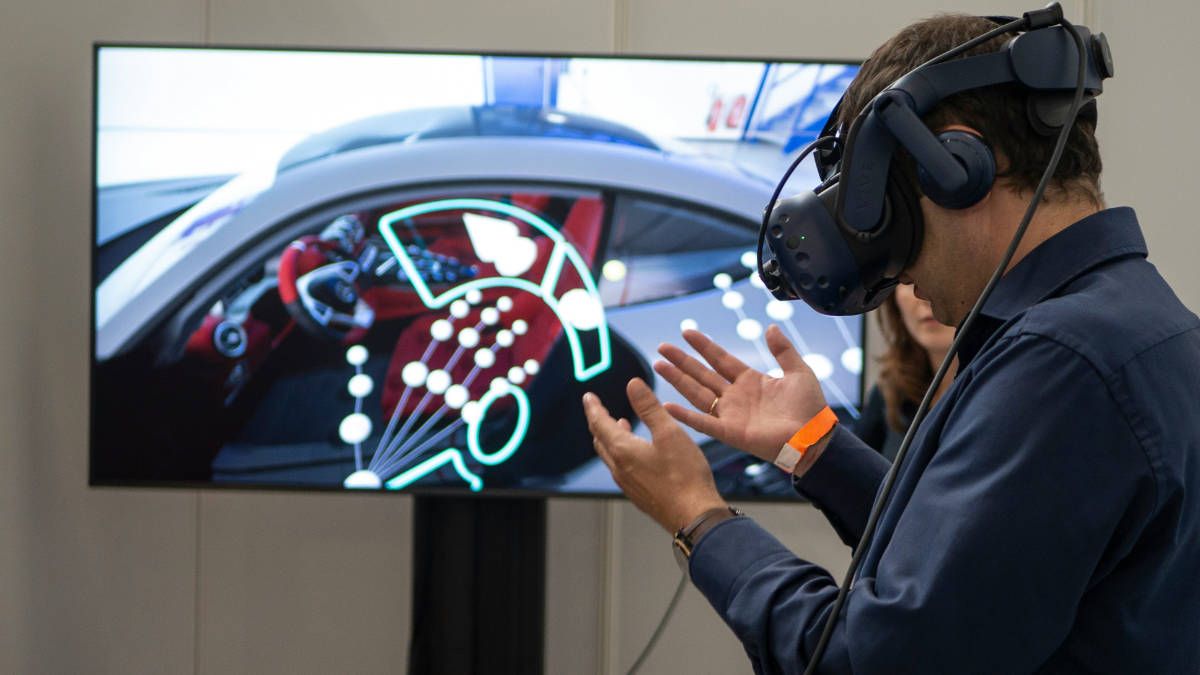
A VR headset at a trade show booth needs a clear area of at least 1 by 1 meter, better 2 by 2 meters (about 3 by 3 feet, better 6.5 by 6.5 feet), a screen for onlookers and one person in charge. A session should take three to five minutes. If you plan this ahead, you will spend little time on the technology at the booth and a lot of time talking to visitors.
We have been supporting exhibitors with virtual reality at trade shows since 2016. The following figures come from these projects.
The key figures at a glance
| Question | Guideline |
|---|---|
| Space per headset | at least 1 by 1 meter, better 2 by 2 meters (about 3 by 3 feet, better 6.5 by 6.5 feet) |
| Length of one session | 3 to 5 minutes |
| Headsets at the booth | usually one to five |
| Headsets per person who also looks after visitors | two at most |
| Headsets per person who only looks after the headsets | up to five |
| Spare device | at least one |
| Internet | depends on the application, usually not needed |
Space: at least 1 by 1 meter, better 2 by 2
How much space a headset needs depends on what visitors do:
- 360° film: Visitors look around and hardly interact. An area of 1 by 1 meter (about 3 by 3 feet) is often enough.
- Moderate interaction: Visitors turn around, reach for things and take a step to the side. We recommend 2 by 2 meters (about 6.5 by 6.5 feet).
- Intensive simulations with a lot of movement: Any extra space helps, if the booth allows it.
What matters is that the area is really clear: no bar table, no display stand, no step. People wearing a VR headset can’t see their surroundings. Plan the area so that nobody walks into it from the aisle.
The screen is part of the setup
A VR headset is an experience for one person. At a trade show booth, though, it should be an experience for everyone who stops by. That is why we show on a screen what the user is seeing. This has three advantages:
- People waiting can see what to expect. They feel less hesitant about putting on the headset.
- Your booth staff can help. They can see where the user is in the application and tell them the next step.
- The conversation starts earlier. People watching already ask questions about the product.
Staff: who looks after the headsets?
Our projects have given us two rules of thumb:
- If one employee looks after visitors and the VR headsets, no more than two devices should be in use at the same time.
- If someone is responsible only for the VR headsets, up to five devices are possible with a little experience.
The person running the headsets doesn’t need to be a technician. They need a briefing: putting on and adjusting the headset, starting the application, cleaning, swapping batteries and knowing what to do if something goes wrong. We give this briefing to your team before the trade show.
How a session works
- Approach: The screen draws visitors in. Your booth staff invite them to try it out.
- Putting it on: Put on the headset, adjust the head strap and briefly explain what is about to happen. People who wear glasses can usually keep them on.
- Experience: The visitor goes through the application. We recommend planning the project so that a session takes three to five minutes. That is enough to leave a lasting impression and keeps the waiting time short.
- Conversation: Someone who has just operated your product themselves asks different questions. Now your sales team takes over.
- Cleaning: The headset is wiped with a disinfectant wipe. The padding is dry after about ten seconds.
How many visitors can one headset handle?
You can estimate this. On top of the three to five minutes in the application, there is putting on the headset, explaining and cleaning. Allow about two minutes for that. A session therefore takes five to seven minutes, and one headset can handle eight to twelve visitors per hour.
| Headsets in use | Visitors per hour | Visitors on an eight-hour trade show day |
|---|---|---|
| 1 | 8 to 12 | 60 to 100 |
| 2 | 16 to 24 | 130 to 190 |
| 5 | 40 to 60 | 320 to 480 |
These are maximum values at full capacity. In practice, there are quiet hours and peak times. Still, the table helps you work out how many headsets you need: if you want to reach 300 visitors a day, one headset won’t be enough.
Equipment: what you should bring
- Spare headset: At least one charged device in reserve.
- Power: One outlet for charging the headsets and batteries and one for the screen.
- Cleaning: Moist disinfectant wipes from a dispenser and a microfiber cloth for the lenses. Keep the wipe dispenser upright during transport, or it will leak.
- Labeled sets: Each headset is packed with its controllers, charging cable and cloth in its own case.
- Internet: Most projects don’t need internet because all the content is on the headset. Poor Wi-Fi in the exhibition hall is then not a problem.
If you don’t want to buy your own devices: for applications we have developed, we provide the headsets, set them up and, if you like, look after them at your booth.
Three mistakes we see often
- The headset sits in a corner. Without a screen and without anyone inviting visitors, hardly anyone puts it on.
- The application is too long. Someone who spends ten minutes in the headset blocks the station, and the people waiting move on.
- Nobody is in charge. When everyone at the booth is a little bit responsible for the headset, the battery is dead by lunchtime.
Conclusion
VR at a trade show booth is not a technology project but a question of planning: a suitable clear area, a screen, one person in charge and an application that gets to the point in three to five minutes. We prepare the rest together.